
ModViz – Modbus Configuration & Visualization Tool for Veawe I/O Modules
ModViz is a powerful yet simple configuration and visualization tool designed to work seamlessly with Veawe Modbus I/O modules. It enables engineers, system integrators, and technicians to quickly configure, monitor, and test field devices through an intuitive graphical interface.
ModViz is a dedicated configuration and monitoring tool for Veawe Modbus I/O modules, designed to simplify device setup, diagnostics, and real-time monitoring.
- Configure Veawe IO modules easily
- Monitor inputs, outputs, and sensors visually
- Built-in Modbus test station – Helpful for configuring third-party devices at register level
- Build-in Server (Slave) simulator – Helpful for connecting to master mode devices
- Works with RTU (RS-485), Modbus TCP, Modbus RTU over TCP in both Master and Slave modes
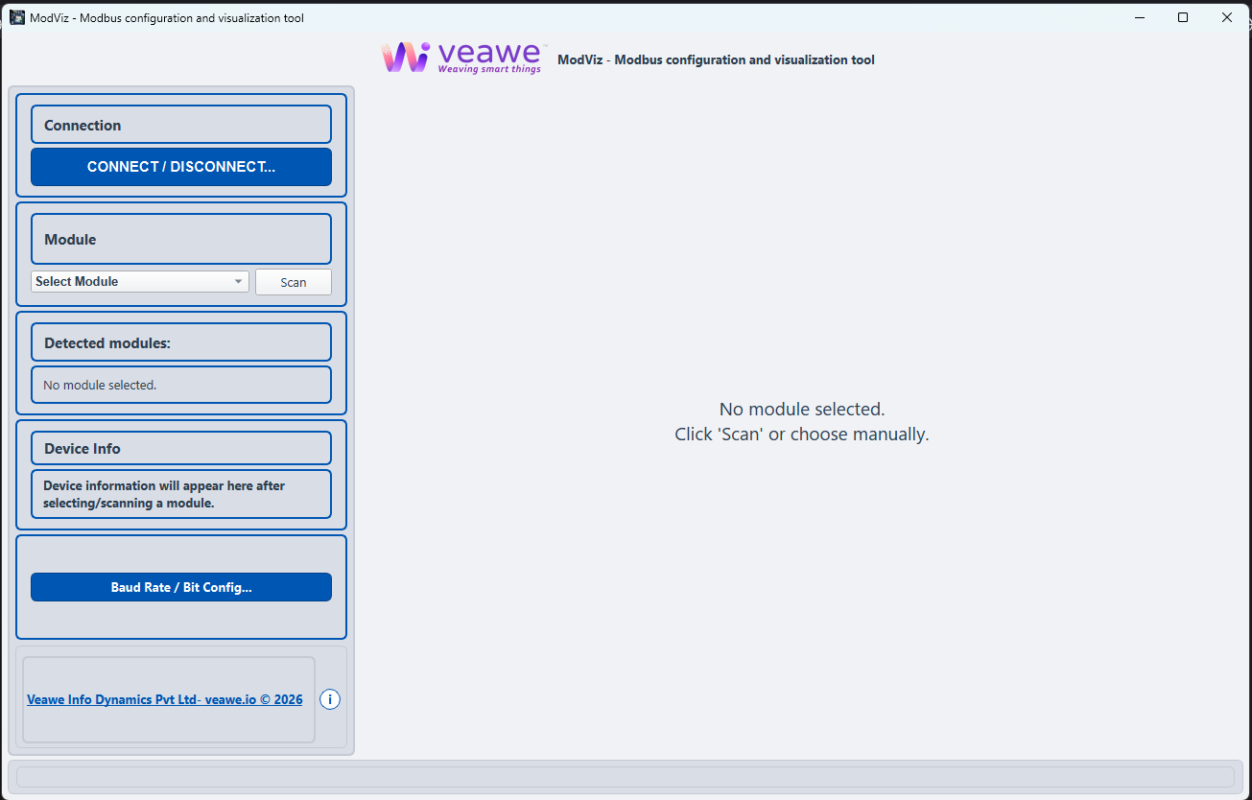
powerful yet simple configuration and visualization tool designed to work seamlessly with Veawe Modbus I/O modules
Unlike generic Modbus diagnostic tools, ModViz is built specifically to simplify the setup and monitoring of Veawe industrial I/O devices, while still providing a general-purpose Modbus test station for register-level communication.
Key Features
Device-Aware Interfaces
Instead of showing raw Modbus registers, ModViz provides dedicated visual dashboards for Veawe modules.
Automatic Module Detection
Quickly scan and detect connected modules on the Modbus network.
Real-Time Monitoring
Observe input status, sensor values, and device connectivity instantly.
Integrated Modbus Test Station
Perform register-level communication testing and debugging.
Built for Veawe Modbus I/O Modules
Industrial automation engineers often spend significant time configuring and verifying field I/O modules. ModViz eliminates this complexity by providing dedicated graphical interfaces for Veawe modules.
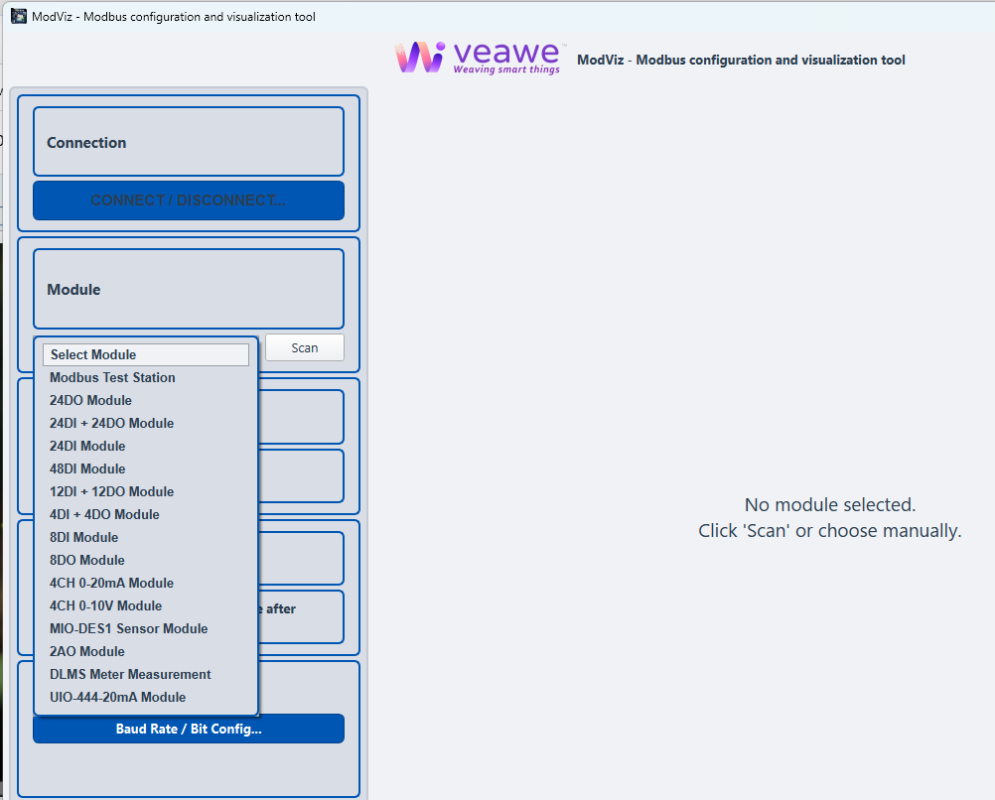
Select a Veawe I/O module manually or use the scan feature to automatically detect connected devices on the Modbus network.
Supported device types include:
- Digital Input Modules
- Digital Output Modules
- Mixed DI/DO Modules
- Analog Input Modules (0–20mA, 0–10V)
- Analog Output Modules
- 4–20mA Universal I/O modules
- Sensor modules
- Energy meter integrations – DLMS Protocol converters
- and more Veawe Modbus-enabled devices
Each module type automatically loads a device-specific interface, allowing users to interact with the hardware visually instead of dealing with raw Modbus registers.
Automatic Module Detection
ModViz simplifies device discovery through its Scan feature, which automatically detects connected modules on the network.
Once detected, the software displays:
- Module type
- Device ID
- Hardware version
- Firmware version
- Build information
This ensures quick verification of connected devices during commissioning.
Device Baud Rate & Communication Configuration
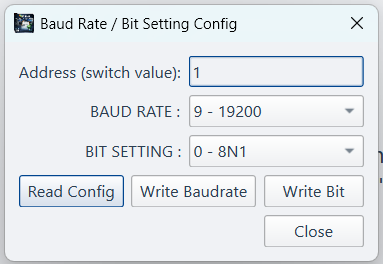
Configure device address, baud rate, and serial communication format directly from ModViz without manually editing Modbus holding registers.
ModViz also provides a convenient interface to configure the communication parameters of Veawe I/O modules directly from the software. Users can read and update device settings such as baud rate, device address (switch value), and serial communication format (bit settings like 8N1) without manually modifying holding registers or using separate configuration tools. The built-in configuration panel allows engineers to read the current device configuration, update baud rate settings, and write bit configuration parameters quickly. This feature simplifies field deployment and ensures that communication parameters between the Modbus master and the I/O module are correctly aligned, reducing setup time during installation and maintenance.
Visual Monitoring of Digital Inputs
For digital input modules such as 48DI controllers, ModViz provides a clear visual dashboard showing the state of each input channel.
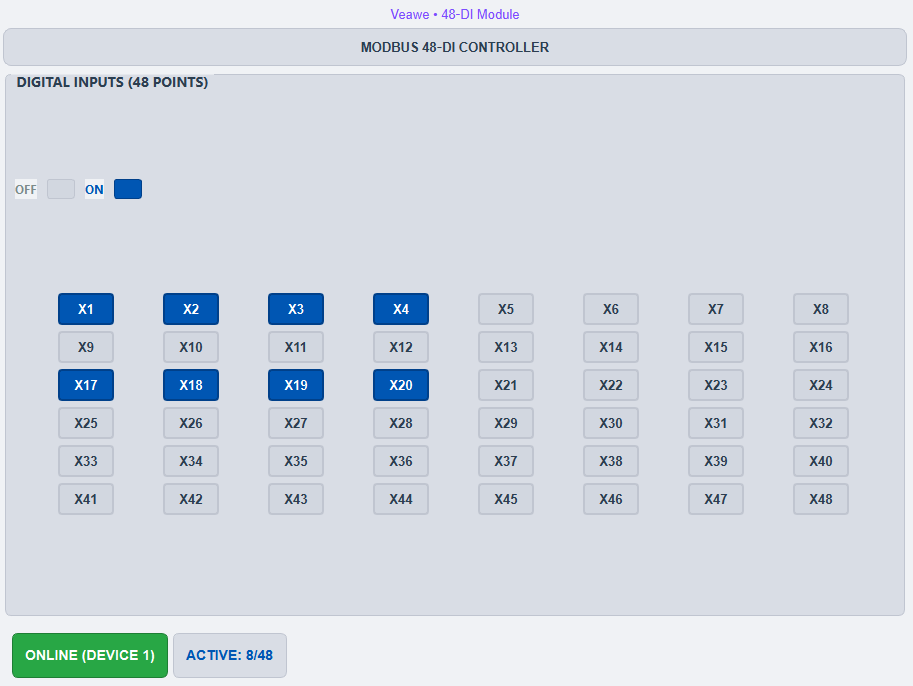
Features include:
- Real-time ON/OFF status
- Grid view of all input channels
- Active input count display
- Immediate visual feedback for field signals
This makes it easy to validate wiring and sensor operation during installation.
Real-Time Sensor Monitoring
For sensor modules like the MIO-DES1, ModViz presents live measurement data in an easy-to-read format.
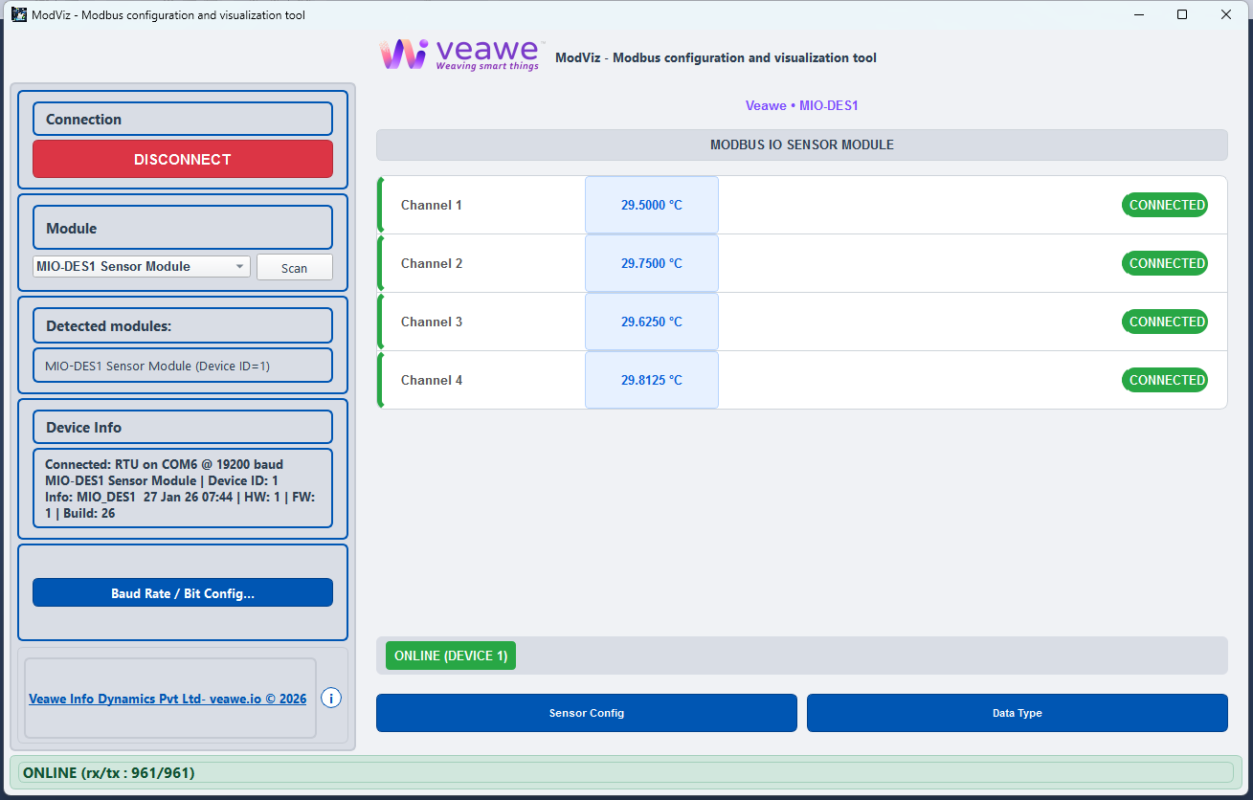
Users can monitor:
- Multiple sensor channels
- Real-time measurement values
- Device connectivity status
- Module configuration settings
This allows engineers to confirm sensor readings instantly without external software or manual register decoding.
General Modbus Test Station
In addition to device-specific interfaces, ModViz also includes a Modbus Test Station for general Modbus communication testing.
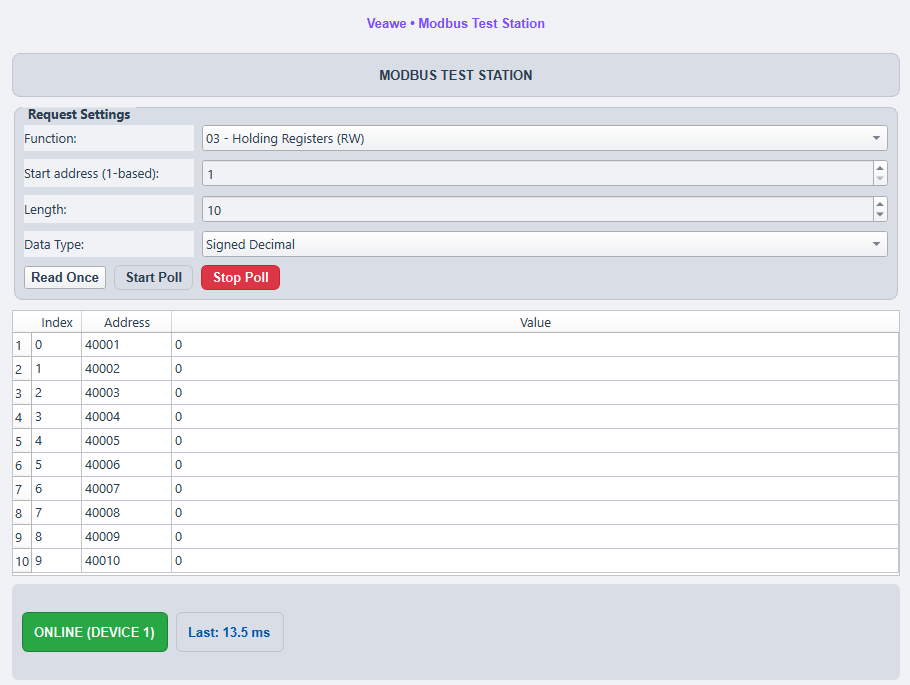
This feature allows users to:
- Read Holding Registers
- Read Input Registers
- Read/Write Coils
- Read Discrete Inputs
Users can configure:
- Function codes
- Start address
- Data length
- Data type interpretation
This built-in test station is useful for debugging Modbus communication and testing third-party devices.
General Modbus Test Station
ModViz also includes a Modbus Slave Simulator for general Modbus communication testing. Listen to complete range of register and all four functions codes
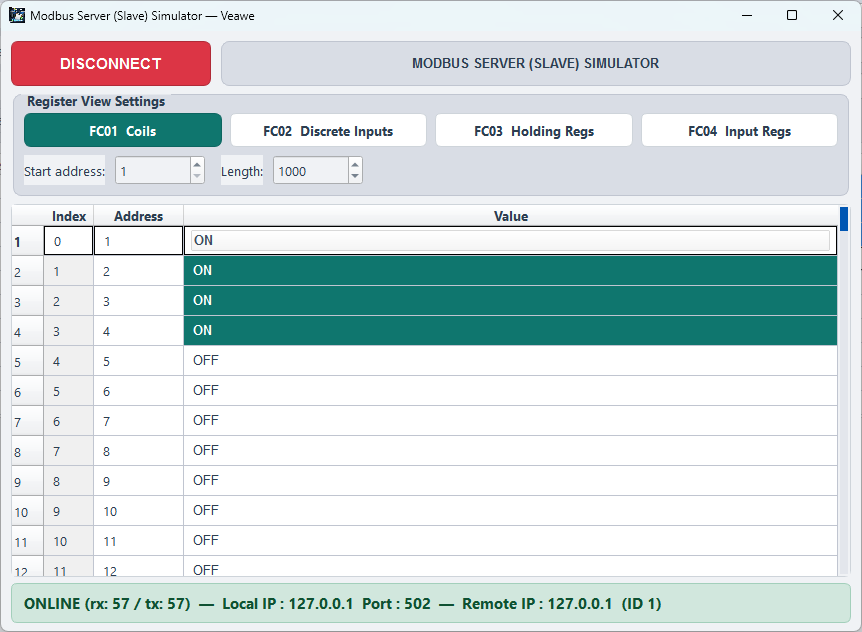
Flexible Communication Options
ModViz supports three common Modbus communication modes:
Modbus RTU (RS-485)
Configuration includes:
- COM port selection
- Baud rate
- Device ID
- Poll delay
- Response timeout
Modbus TCP
Users can connect via:
- IP address
- TCP port (default 502)
- Device unit ID
This flexibility allows ModViz to work with both serial and Ethernet-based Modbus networks.
Modbus RTU over TCP
Handy for RTU device connected over a n Ethernet network using converters
Designed for Fast Commissioning
During installation and commissioning, engineers need tools that provide quick visibility and easy configuration.
ModViz accelerates this process by providing:
- Module auto-detection
- Device-specific UI panels
- Live status indicators
- Instant register testing
- Integrated communication diagnostics
This significantly reduces setup time and troubleshooting effort.
Key Advantages
ModViz offers several advantages over generic Modbus tools:
| Feature | ModViz |
|---|---|
| Device-specific interfaces | ✓ |
| Veawe I/O module support | ✓ |
| Visual channel monitoring | ✓ |
| Built-in Modbus test station | ✓ |
| Built-in Modbus slave simulator | ✓ |
| Simplified configuration workflow | ✓ |
Rather than only displaying raw register values, ModViz focuses on making device interaction simple and intuitive.
Typical Applications
ModViz is ideal for:
- Industrial automation system setup
- Field device commissioning
- Veawe I/O module configuration
- Modbus communication debugging
- Sensor validation and monitoring
It is particularly useful for system integrators and field engineers working with Veawe hardware platforms.
Download ModViz
Download the latest version of ModViz and start configuring your devices quickly.
Download:
Automatic Update Notification
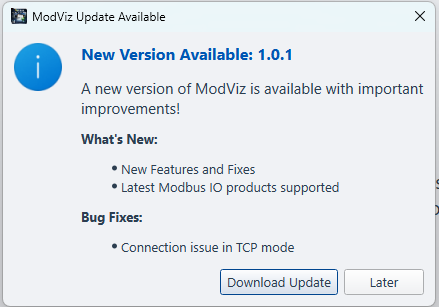
ModViz includes a built-in update notification system that checks for new software versions when the application starts. If a newer version is available, users receive a clear notification showing the latest version number, new features, and bug fixes included in the update. From the notification window, users can directly download the latest release or choose to update later. This ensures that engineers always have access to the latest improvements, device support updates, and stability fixes without manually checking for updates.
How ModViz Works
1️⃣ Connect to device via RS-485 or Modbus TCP
2️⃣ Click Scan to detect modules
3️⃣ Select module type
4️⃣ Monitor and configure device instantly
Why Use ModViz Instead of Generic Modbus Tools?
Many Modbus tools such as ModScan, Modbus Poll, or QModMaster focus mainly on reading and writing raw registers. While these tools are useful for protocol testing, they often require engineers to manually interpret register maps and device documentation.
ModViz goes a step further by providing device-aware interfaces specifically designed for Veawe I/O modules. Instead of working directly with raw Modbus registers, users interact with visual dashboards, configuration panels, and channel-level monitoring screens.
This approach offers several advantages:
- Visual representation of I/O channels instead of raw register values
- Automatic module detection to simplify device identification
- Dedicated configuration panels for device settings
- Faster commissioning and troubleshooting
- Integrated Modbus test station for general Modbus operations
By combining device-specific configuration tools with a general Modbus testing interface, ModViz becomes both a practical field tool and a powerful diagnostic utility.